HackHub Ultimate Hacker Simulator Nmap Scanning in HackHub
Recon workflows that survive session-randomized networks and moving targets.
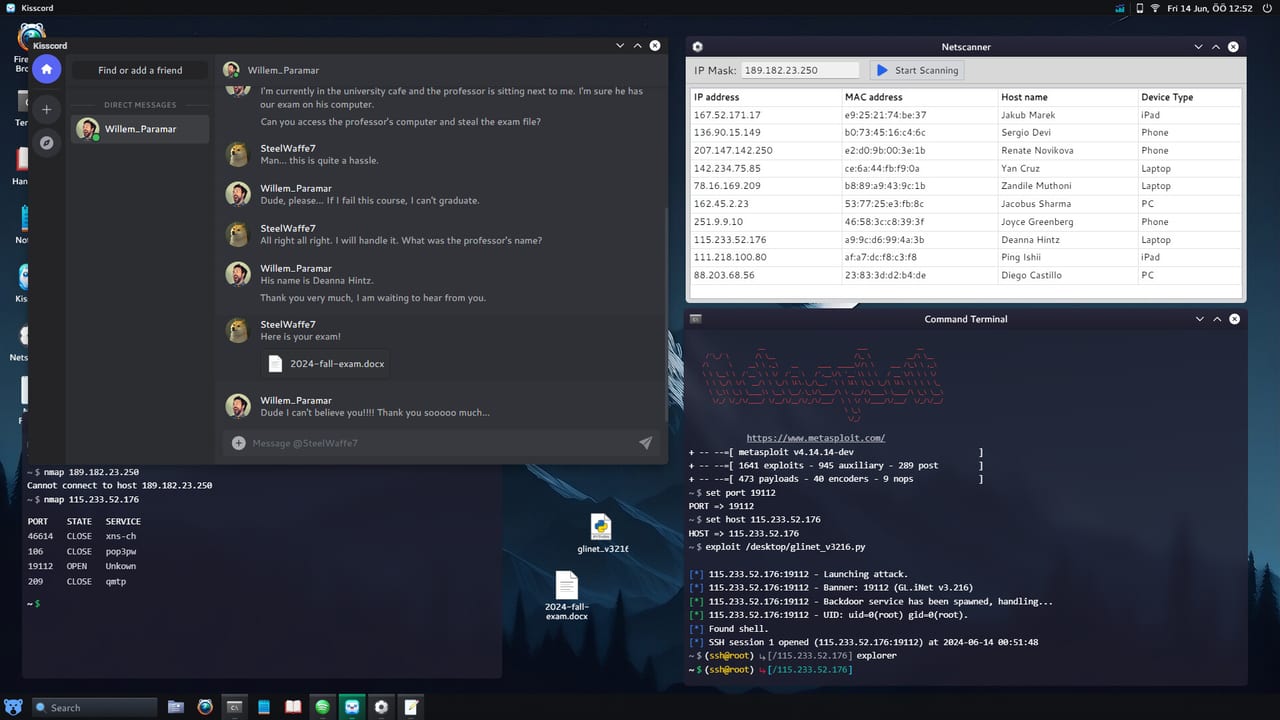
Nmap is the reconnaissance workhorse in HackHub Ultimate Hacker Simulator. HotBunny integrated a game-balanced build that supports host discovery, port scanning, service/version detection, and scripted output—enough depth to feel authentic on Steam app 2980270 without requiring you to memorize a static network map. Every contract can roll different subnets, filtered ports, and decoy hosts, so successful operators document what they scanned and why, not a single “golden” IP from an outdated clip.
If you have not yet comfortable with basic shell navigation, read the Commands Reference first. Nmap assumes you can read ifconfig output, save logs, and pipe results into files for later Metasploit module selection.
Install and verify Nmap
Most saves unlock Nmap through early missions or the package manager:
sudo apt update && sudo apt install nmap
nmap --version
Confirm your scan source address with ip addr before running aggressive sweeps. Missions sometimes require scanning from a specific interface—use -e eth0 (or whichever adapter the briefing labels) when direct pings fail despite a valid route.
Phase 1: Host discovery
Start wide, then narrow. Replace the CIDR below with the range shown in your mission journal:
nmap -sn 10.42.0.0/24 -oG - | grep Up
nmap -sn -PS22,80,443 TARGET_RANGE
-sn skips port scanning and only checks liveness—fast on large internal maps like those in Getting Started. Note every “Up” host in hosts.txt; randomized seeds may hide the primary objective behind a secondary machine.
When discovery returns nothing, verify you are on the correct VLAN icon in the UI, then try ARP-assisted scans on local segments:
sudo nmap -PR -sn 192.168.x.0/24Again, substitute the octets your briefing displays—do not assume 192.168.0.0/24 every time.
Phase 2: Port scanning strategies
Once you have candidate hosts, escalate granularity:
nmap -sS -p- --min-rate 1000 TARGET
nmap -sV -sC -p 22,80,443,8080 TARGET
nmap -Pn -p 1-65535 TARGET   # when ICMP is filtered
SYN scans (-sS) need elevated privileges inside the VM—use sudo when the game allows. Version detection (-sV) feeds directly into exploit selection; a banner showing an outdated web server might map to a module listed on the Metasploit page.
For stealth-oriented story branches (including tighter timelines in Journalist’s Sister), slow down:
nmap -sS -T2 -p 22,80,445 TARGETHigher -T values finish faster but may trigger optional intrusion alerts on hard mode.
Phase 3: UDP and specialty probes
Some randomized services listen only on UDP—DNS, SNMP, or game-original protocols:
nmap -sU --top-ports 50 TARGET
nmap -sU -p 161 TARGET -sV
UDP scans are slower by design. Run them while you manually review HTTP content on open TCP ports so you are not idle.
Script scanning (-sC) runs default NSE scripts safe for most missions:
nmap -sV -sC -p 80 TARGETRead script output for default credentials, misconfigured headers, or internal hostnames that were not visible during ping sweeps.
Reading and storing results
Professional habits keep you sane when seeds change:
nmap -sV -oA scan/TARGET TARGETThe -oA flag writes grepable, normal, and XML formats under scan/. Before Password Cracking, grep for ssh, ftp, or http-auth services:
grep -i "ssh\|http\|smb" scan/TARGET.nmapCompare new scans after every major story unlock—1.0 multiplayer maps may open fresh subnets when players join a shared instance.
Common HackHub scan patterns
| Situation | Nmap approach | Follow-up |
|---|---|---|
| Unknown internal net | -sn on briefing CIDR | Port scan live hosts only |
| Web app only hint | -p 80,443,8080,8443 -sV | Browse UI, then Metasploit web modules |
| ”Machine unreachable” | -Pn + -e interface | Re-check VPN/tunnel mission step |
| Credential brute force next | -sV on login services | Hydra in Password Cracking guide |
| Post-1.0 PvP race | Fast -F then targeted -p | Prioritize services that award flags |
Integration with other tools
Nmap output is input for the rest of the chain:
- Metasploit —
search type:exploit servicenameusing banners you logged. - Hydra — open
ssh,ftp, or HTTP form ports you confirmed—not guessed. - Code++ — automate repeated sweeps via Code++ scripts once you trust your flags.
- Workshop mods — some Steam Workshop packs add NSE-style helpers; verify they respect multiplayer rules.
None of these replace manual verification on first contact with a new mission type.
Randomized world pitfalls
Duplicate hostnames. DNS entries may rotate while IPs stay stable—always scan by IP after the first resolution.
Filtered vs closed. filtered often means a firewall or wrong source interface; closed means the host responded but the port is inactive.
Decoy hosts. Early Access and 1.0 seeds can spawn honeypots with open ports but no exploitable service—correlate Nmap with mission objectives instead of attacking every open port blindly.
Patch and multiplayer notes
The August 1, 2026 full release added online play and Steam Workshop distribution. Shared sessions may synchronize a host list across players—re-scan after teammates trigger story events that “open” new segments. Balance tweaks to scan timing are documented on the Updates Hub and Full Release 1.0 page.
Practice drill
On your current save:
- Write down the CIDR from the mission UI.
- Run discovery and save live hosts.
- Version-scan the top three interesting targets.
- Pick one service banner and find a matching exploit without looking up a walkthrough IP.
Repeat until you can reach a shell using only scan notes you captured yourself—that is the skill Nmap is meant to teach in HotBunny’s simulator.
Frequently Asked Questions
Quick answers to common HackHub questions.
Why does Nmap show different ports than a video guide?
Sessions randomize targets. The scan process is the same; only the live hosts and open ports change per save or multiplayer instance.
Do I need sudo for Nmap?
SYN scans and some discovery modes require elevated privileges inside the game VM. Use sudo when the terminal allows it.
What scan should I run first?
Start with -sn host discovery on the subnet your briefing lists, then run -sV on live hosts you care about.
How does Nmap tie into Metasploit?
Service banners from -sV scans tell you which exploit modules to search for in msfconsole.