HackHub Ultimate Hacker Simulator HackHub Getting Started Guide
From Steam launch to your first successful scan — no copied IPs required.
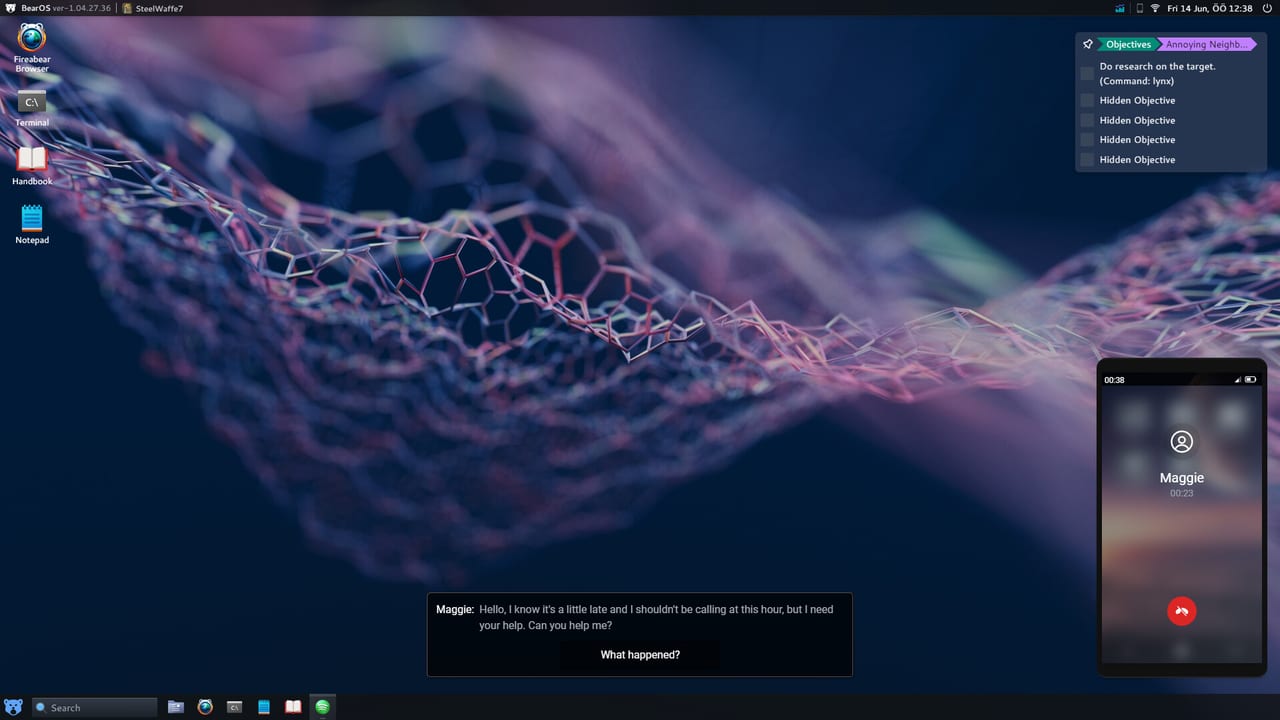
HackHub Ultimate Hacker Simulator drops you onto a fully simulated desktop where real command names matter. Published by G-DEVS.com and Games Operators, the full 1.0 build arrived on August 1, 2026 after Early Access on January 26, 2026. This guide covers the first hour: orientation, terminal basics, and the habits that prevent you from rage-quitting when a target shows zero open ports.
Launch and desktop layout
After starting from Steam (app ID 2980270), you land on a Linux-style desktop with a mail client, browser, app store, and terminal icon. Pin the terminal to your taskbar — nearly every job begins there. Open Settings once to confirm mouse sensitivity and fullscreen behavior; macOS players should verify window focus because some builds map Cmd differently than Ctrl on Windows.
Your in-game phone and mail apps deliver story beats and contract offers. Ignore paid jobs until you finish the built-in tutorial prompts; they introduce whois, nmap, and the Database Manager without time pressure.
Terminal fundamentals
HackHub accepts familiar penetration-testing syntax. Commands do not need a leading $ prompt symbol — type exactly as shown in mission briefs. Use Up Arrow to recall history; long scans like nmap <target-ip> -sV should be reused whenever the target changes rather than retyped.
Start every unknown host with service detection:
nmap <discovered-ip> -sVReplace <discovered-ip> with whatever address the mission or whois output gives your save. If you see filtered or closed on every port, the guide is not wrong — you likely need a prerequisite step such as phishing, Wi-Fi access, or port forwarding before the service exposes itself.
Discovering targets the right way
Story and contract text rarely hand you a ready IP. Typical flow:
- Read the domain or company name in mail or the job board.
- Run
whois <domain-from-mission>to pull registrar server fields. - Scan the server IP with
nmap -sV. - Feed open service + version into Metasploit or a dedicated app (Database Manager, Fern, etc.).
Never paste IPs from YouTube comments or old Reddit threads — those values belong to other players’ randomized sessions. Document your findings in a text file on the in-game desktop so you do not confuse Carl’s laptop with the hotel reception host mid-chapter.
Code++ and Workshop
Code++ is HackHub’s scripting editor for automating repetitive typing. You do not need it in hour one, but skim the app so you know where community scripts live. The Steam Workshop hosts QoL macros; browse Scripts on this wiki for curated examples compatible with recent patches. Custom scripts cannot bypass randomized passwords — they only save keystrokes.
First paid contract vs story mail
The Hack the Hub board pays for discrete tasks such as database price edits or credential leaks. They teach the same toolchain as the main campaign The Journalist’s Sister but with shorter arcs. After your first successful nmap exploit chain, take one small contract to learn how payouts fund tool upgrades in the shop.
Story mail moves automatically when you satisfy evidence flags — usually a file download, screenshot, or forwarded port proof. If a chapter stalls, switch to a contract for cash and return with better wordlists or upgraded Wi-Fi gear from How to Play.
Tool shopping priorities
Early income should buy:
- Larger wordlists for
hydraandjohn - Wi-Fi adapter upgrades (see Wi-Fi and Hashcat)
- Metasploit module unlocks if your edition gates them
Defer cosmetic desktop themes until you own Hashcat and Bettercap licenses in-game — cracking neighbor Wi-Fi unlocks alternate routes on several chapters.
Metasploit first contact
When nmap -sV reports an open service with a version string, open Metasploit via msfconsole, then:
search <service-keyword-from-nmap>
use <module-index-or-name>
set RHOST <target-ip>
set RPORT <open-port>
set Version <version-string-from-scan>
show options
exploit
The critical habit is show options twice — once after use, once after all set commands. Required fields left at defaults cause silent failures that feel like bugs. Full syntax lives on Tools Commands.
Multiplayer and saves
Online multiplayer arrived in 1.0. Your single-player save remains separate; do not expect co-op story progress in the first session. Read Multiplayer before inviting friends so you understand PvP boundaries and shared contract lobbies.
When you get stuck
Stuck players usually skipped a scan step or reused an IP from an earlier objective. Re-read the active mail thread, rerun nmap -sV, and compare results to your notes. For story-specific gates, open Journalist’s Sister. For keyboard help, see Controls.
Next steps
Once you can reliably chain whois → nmap → Metasploit, proceed to How to Play for economy pacing and chapter routing. Verify your PC meets specs on System Requirements if performance stutters during Bettercap captures.
Frequently Asked Questions
Quick answers to common HackHub questions.
Does HackHub use real hacking tools?
Yes. The game simulates nmap, hydra, metasploit, sqlmap, hashcat, bettercap, john, and related workflows. Syntax matches real tools closely enough to build transferable habits.
Why does nmap show no open ports on my target?
Many objectives require a prior step: phishing mail, Wi-Fi intrusion, or router forwarding. Randomized layouts also hide services until you trigger the correct story flag.
Can I copy IP addresses from online walkthroughs?
No. Each save generates its own hosts. Follow command templates with IPs from your whois and nmap output instead.
Should I play the Steam demo first?
The demo teaches core terminal loops with a content cap. It is a good free trial before buying the full Windows or macOS release on Steam.
Where is the in-game command handbook?
Open the help app on your desktop or visit the Tools and Command reference pages on this wiki for extended examples beyond the tutorial.