HackHub Ultimate Hacker Simulator HackHub Troubleshooting & Softlock Fixes
When objectives stall, ports stay closed, or the desktop misbehaves — process-first recovery.
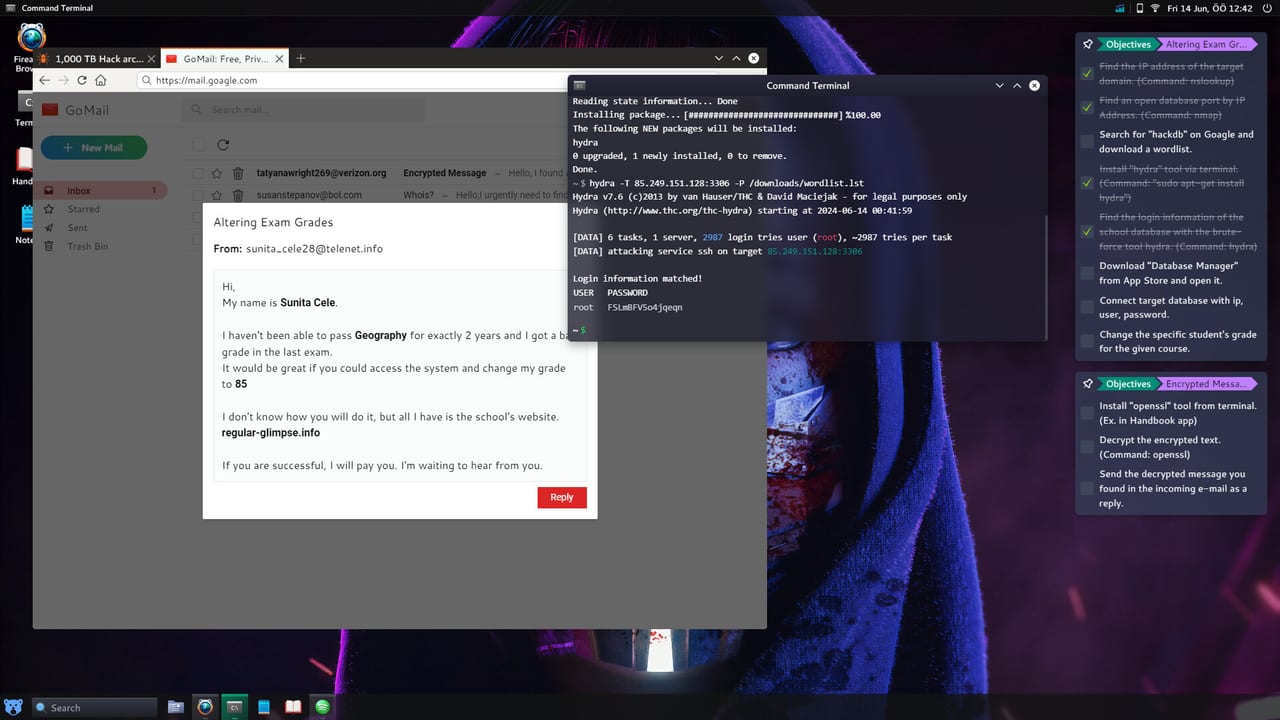
HackHub Ultimate Hacker Simulator randomizes networks, credentials, and topology every save, which means most “bugs” are actually missed steps — but HotBunny’s Early Access and the August 1, 2026 version 1.0 release also shipped real issues that patches addressed. This guide separates player fixable problems from client quirks, always emphasizing repeatable verification over copied IPs from someone else’s Steam session (app 2980270).
Use it alongside Getting Started when you are new, Journalist’s Sister when story mail stops advancing, and HackTheCube when challenge floors feel broken. Nothing here requires external tools — only in-game commands, saves, and sensible restarts.
Quest not advancing or objective shows ?
When the journal displays ? instead of a clear task, the game usually waits for a story trigger you have not fired yet. Work through this checklist before assuming corruption:
- Reread the active mail thread — subjects often name the employee to phish or the file to download.
- Rerun
nmap <target-ip> -sVon the host from your notes, not an IP from a video. - Confirm evidence files sit in inventory with exact filenames mail requested.
- Check NPC online status — some chapters require Twotter or mail bait before ports open.
- Press the objective hint key if your build maps one — the
?icon sometimes expands after a failed attempt.
If all triggers are satisfied and the flag still will not flip, manual-save rollback one chapter back is safer than deleting random files. Story routes in Journalist’s Sister document checkpoint habits; 1.0 patches specifically fixed several Part progression softlocks — update Steam before replaying.
Closed ports on every scan
nmap reporting closed or filtered on all ports is the most common support topic. Causes in order of frequency:
| Symptom | Likely cause | Fix |
|---|---|---|
| All closed on story target | Phishing or router step not done | Send mail bait, configure Fern forwarding, rescan |
| Filtered on internal IP | Wrong VLAN or interface | Use -e flag per Nmap guide |
| Closed after exploit worked | Scanning old IP post-pivot | Update notes; scan newly routed host |
| Closed only in MP | Session slice not discovered | Fresh whois in lobby per Multiplayer |
Never swap Metasploit modules until a fresh -sV scan proves the service exists on your current target.
Softlocks and evidence mistakes
Softlocks happen when you delete shared evidence, attack optional hosts destructively, or skip mail replies. Prevention beats recovery:
- Save before major branches — especially macro payloads and router edits.
- Archive proof files before running cleanup commands like
clearlogsin multiplayer contexts. - Avoid overwriting shared drives referenced in future chapters.
If already soft-locked, load the nearest manual save. The 1.0 patch pass improved fail-state messaging for Journalist’s Sister — players on outdated builds should verify files via Steam before wiping saves.
Notepad unsaved notes
The desktop Notepad does not always autosave. Players who draft long IP lists or password fragments lose work when:
- Restarting a HackTheCube floor without saving the file.
- Loading an older save while Notepad stays open.
- Closing the game from the OS task manager.
Fix: Save Notepad to a named file on the virtual desktop (~/notes/mission.txt) early each session. Prefer the in-game file manager for persistent logs over leaving untitled buffers open.
Twotter and search re-query issues
Social chapters sometimes require finding a handle on Twotter (in-game Twitter fiction). If search returns stale or empty results:
- Copy the handle exactly as mail spells it — including underscores.
- Log out and back into the search app if the UI caches an old query.
- Complete prerequisite mail steps; some profiles stay hidden until bait mail sends.
- Restart the game client once if the app blanked after alt-tab on macOS.
Re-search does not mean the RNG broke — it often means the profile unlocks after a different trigger.
Restart fixes that actually help
A full game restart resolves transient state without nuking saves:
- Terminal sessions hung after long
hashcatjobs. - Mail app not fetching new threads post-exploit.
- Metasploit handler desync when
LHOSTchanged mid-chapter. - Workshop scripts stuck after unsubscribe.
Restart after saving Notepad and manual save slots. Avoid deleting %USERPROFILE% game data until Steam “Verify integrity” fails.
macOS desktop icon bugs
Apple Silicon and Intel macOS builds occasionally suffer UI glitches absent on Windows:
- Double-click ignored on terminal or browser icons — single-click focus then Enter, or use dock/context menu open.
- Window off-screen after resolution change — toggle fullscreen in Settings, then revert.
- Cmd vs Ctrl confusion in terminal paste — see Controls.
Report persistent icon failures on the HotBunny forum with macOS version and Steam build ID. Workaround: launch apps from terminal using xdg-open equivalents shown in mission help text when available.
Directory not initialized and Wi-Fi errors
Post-patch players reported Directory not initialized when opening network tools or Wi-Fi capture apps. This usually ties to VM state not finishing boot:
- Wait for desktop idle animation to finish before opening Bettercap or Wi-Fi panels.
- Run
ifconfigin terminal — if interfaces are missing, reload save or restart client. - Reinstall virtual network packages via in-game store if the mission expects upgraded hardware per Wi-Fi and Hashcat.
- Apply latest Steam patch — HotBunny shipped Wi-Fi init fixes alongside 1.0 Journalist polish.
If captures fail with “adapter not found,” buy or equip the dongle in the shop before blaming Hashcat syntax.
Multiplayer-specific friction
Online modes add lobby desync and chat misunderstandings:
- Stale target IP in chat — rerun
whoislocally; lobbies roll procedural companies per session. openvpn/pivotfailures — confirm teammate completed recon on the same subnet slice.- Banking app empty — economy is per MP character; see Multiplayer banking section.
When to escalate beyond this guide
- Steam Verify integrity after patches.
- Compare build date with Updates hub and Full Release 1.0.
- Forum / Discord links on Community wiki for unlisted regressions.
Prevention habits
Operators who rarely need troubleshooting:
- Keep a saved
notes.txtwith your IPs per chapter. - Run
show optionsbefore every Metasploit exploit. - Rescan after every story trigger instead of trusting yesterday’s
nmaplog. - Finish Getting Started checklist before marathon sessions.
Randomization is a feature — when process fails, fix the process first. When the client misbehaves, patch, restart, and restore saves in that order.
Frequently Asked Questions
Quick answers to common HackHub questions.
Why does my objective show a question mark?
Usually a missing story trigger — mail bait, evidence file, or rescan after an NPC comes online. Reread the thread and rerun nmap before reloading saves.
I saved IPs in Notepad and they vanished — why?
Notepad may not autosave. Save to a named file on the desktop or reload a manual save slot if you restarted a level or the game.
Does restarting HackHub delete progress?
No. Restart clears transient UI and terminal state. Manual saves and Steam Cloud slots remain unless you delete them intentionally.
Were Journalist's Sister softlocks fixed in 1.0?
Yes. Several Part progression blockers received patches at full release. Update Steam before replaying stuck chapters.
What is Directory not initialized?
A network VM boot error, often fixed by waiting for desktop load, restarting the client, or applying Wi-Fi-related patches from HotBunny.